VibeMV Base vs Pro: Which Model Tier Should You Choose?
Not sure if VibeMV Pro is worth 6x the credits? This guide breaks down exactly when Base is enough and when Pro makes a visible difference — with real cost examples.
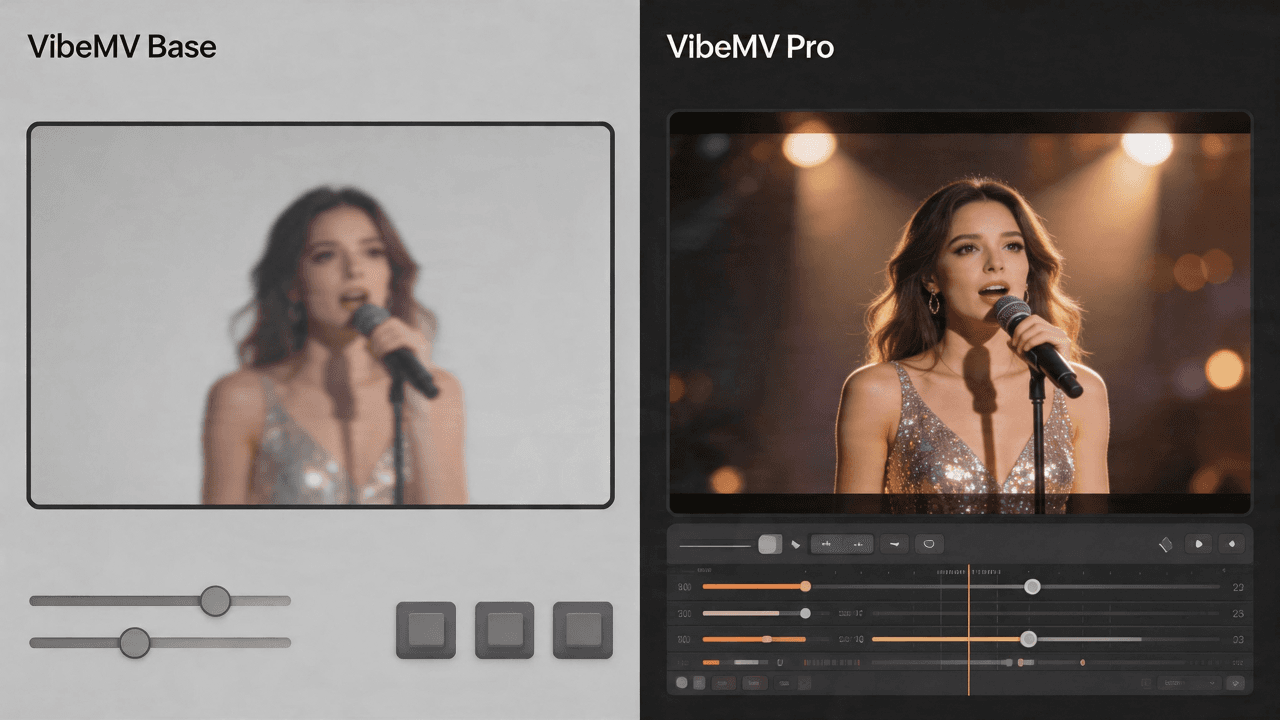
VibeMV's AI music video generator offers two model tiers: Base (2 credits/second) and Pro (12 credits/second). Pro tier costs 6x more — a 3-minute music video goes from 360 credits to 2,160 credits. So the question isn't whether Pro is better (it is), but whether the improvement is worth the cost for your specific project.
This guide gives you a practical framework for deciding. For the technical details on what each model does, read our Pro Models feature guide.
Key Takeaways
- Use Base for drafts, instrumentals, social teasers, anime styles, and budget projects
- Use Pro for official releases, vocal performances, close-ups, and YouTube/Spotify content
- Mix both in the same video (Pro for vocals, Base for instrumentals) to save 20-65%
- Biggest quality jump: Pro lipsync (OmniHuman-1.5) — full-body performance vs mouth-only sync
- Base actually wins for anime/animation visuals (Seedance outscores Kling in this category)
- See pricing plans for credit allocations per subscription tier
The Short Answer
| Your Situation | Recommendation |
|---|---|
| Drafting or testing ideas | Base — iterate fast, save credits |
| Instrumental or ambient track | Base — no lipsync needed, Seedance handles visuals well |
| Quick TikTok/Reels teaser (15-30s) | Base — small screen, short attention span |
| Anime or stylized visual style | Base — Seedance scores higher for animation |
| Official YouTube music video | Pro (at least for vocal segments) |
| Vocal-heavy track (pop, rap, R&B) | Pro lipsync — OmniHuman's expressiveness matters |
| Close-up character shots | Pro video — Kling V3 Pro holds detail at 1080p |
| Spotify Canvas (3-8s loop) | Base — Canvas doesn't sync to audio; abstract visuals work better |
| Budget under $19/month | Base — maximize your credits |
When Base Is Enough
Instrumental and Ambient Music
If your track has no vocals (or minimal vocals), lipsync quality is irrelevant. Base tier Seedance-1.5-Pro generates solid visuals for abstract, atmospheric, and instrumental content. You're paying for lipsync expressiveness you won't use.
Example: A 3-minute lo-fi instrumental track with ambient visuals — 360 credits on Base versus 2,160 on Pro. Same result.
Social Media Teasers
TikTok and Instagram Reels are viewed on phone screens at compressed quality. The subtle improvements in lighting detail and micro-expressions that Pro delivers are largely invisible at mobile resolution and short view times.
Example: A 30-second vertical teaser clip — 60 credits on Base. Good enough for social. Save Pro for the full YouTube release.
Drafting and Iteration
Your first render is rarely your last. Use Base to test prompts, character styles, and segment timing. Once you're happy with the creative direction, upgrade specific segments to Pro for the final version.
Example: Generate a full 3-minute video on Base (360 credits), review, then re-generate 3 key vocal segments on Pro (3 × 10s × 12 = 360 credits). Total: 720 credits instead of 2,160.
Animation and Anime Styles
Seedance-1.5-Pro (Base normal model) actually outscores Kling V3 Pro on animation content by +2.8 points and anime-specific content by +12.3 points on independent benchmarks. If your music video uses stylized, non-photorealistic visuals, Base may produce objectively better results.
When Pro Makes a Real Difference
Vocal-Heavy Performances
The biggest quality jump in the entire Pro tier is lipsync expressiveness. Base lipsync moves the mouth. Pro lipsync performs the song — with head movement, hand gestures, micro-expressions, and body language synchronized to the emotional tone of your vocals.
This matters most for:
- Pop and R&B — emotional delivery where facial expression sells the performance
- Rap — physical energy, gestures, and head movement that match flow intensity
- Acoustic/singer-songwriter — intimate performances where subtlety matters
- Cover songs — where the vocal performance IS the content
Close-Up and Portrait Shots
Kling V3 Pro maintains sharp character detail at full 1080p. Base tier can soften at the edges on tight frames. If your music video features close-up shots of the character's face, Pro video quality is visibly better.
Multi-Scene Music Videos
Kling V3 Pro excels at maintaining lighting and style consistency across different scenes. If your music video has 6-10 distinct visual segments (typical for a structured song), Pro keeps them feeling like parts of one cohesive video rather than separate generations.
Official Releases
Any video going to YouTube as an official music video, embedded on your artist website, or submitted to music blogs — use Pro for at least the vocal sections. The audience expects higher production value on these platforms.
The Mixed Strategy: Best of Both
Most music videos aren't 100% vocals or 100% instrumentals. A typical pop song might be:
- Intro (instrumental) — 15s
- Verse 1 (vocals) — 30s
- Chorus (vocals) — 25s
- Verse 2 (vocals) — 30s
- Chorus (vocals) — 25s
- Bridge (mixed) — 15s
- Final chorus (vocals) — 25s
- Outro (instrumental) — 15s
Total: ~3 minutes. Vocals: ~2:15. Instrumentals: ~0:45.
| Strategy | Cost | Quality |
|---|---|---|
| All Base | 360 cr | Good throughout |
| All Pro | 2,160 cr | Premium throughout |
| Mixed: Pro vocals + Base instrumentals | ~1,620 cr Pro + ~90 cr Base = 1,710 cr | Premium where it matters, good elsewhere |
| Mixed: Pro lipsync only + Base everything else | ~1,620 cr Pro + ~90 cr Base = 1,710 cr | Best lipsync quality, standard visuals |
The mixed strategy saves 20-65% compared to all-Pro while keeping Pro quality on the segments viewers pay most attention to.
How to Set Up a Mixed Project
- Upload your audio and let VibeMV segment the song automatically
- Review the segments — identify which are vocal-heavy
- Set vocal segments to Pro (click the toggle in each shot card)
- Leave instrumental segments on Base
- Generate — each segment renders with its selected tier
- Review and iterate individual segments if needed
Cost Planning by Plan
| Plan | Monthly Credits | All-Base (3 min MV) | Mixed (3 min MV) | All-Pro (3 min MV) |
|---|---|---|---|---|
| Free | 50 (one-time) | ~8 sec test clip | — | ~4 sec test clip |
| Hobby $19/mo | 600 | ~1.6 full videos | ~0.35 videos | Not practical |
| Pro $49/mo | 1,700 | ~4.7 full videos | ~1 video | ~0.78 videos |
| Studio $99/mo | 3,800 | ~10 full videos | ~2.2 videos | ~1.7 videos |
Recommendation by budget:
- Hobby plan: Use Base for everything, upgrade 1-2 key segments to Pro when it matters
- Pro plan: Mixed strategy is sustainable — one polished mixed-tier video per month
- Studio plan: Can afford regular Pro-tier production, or 2+ mixed-tier videos per month
One-Time Credit Packs
If you run out of monthly credits but need Pro for a specific project, one-time packs start at $19 for 400 credits (valid 365 days). This is enough for:
- ~33 seconds of Pro generation, or
- ~3 minutes and 20 seconds of Base generation
Common Questions by Use Case
"I'm releasing my first single"
Use the mixed strategy. Generate on Base first to dial in the creative direction, then re-generate vocal segments on Pro for the final version. Budget: ~1,000-1,500 credits total with iteration.
"I make content daily for social media"
Stick with Base. The quality difference isn't worth 6x the cost for short-form social content. Save Pro for milestone releases.
"I'm a producer making visuals for client tracks"
Use Pro for client deliverables, Base for internal drafts and previews. The Studio plan gives you enough credits for regular production.
"My music is electronic/instrumental"
Base is your best bet. No vocals means no lipsync advantage from Pro. And if your visuals are abstract or animated, Seedance (Base) may actually produce better results than Kling (Pro).
"I want the absolute best quality"
All-Pro on the Studio plan. Generate everything on Pro, iterate until satisfied. Budget roughly 2,500-3,000 credits per 3-minute video including iterations.
Frequently Asked Questions
Is VibeMV Pro worth the extra cost?
It depends on where the video will be published and how prominent the vocal performance is. Pro delivers visible improvements in lipsync expressiveness and video detail — especially on close-ups and emotional performances. For social media teasers and instrumental tracks, Base is usually sufficient. For YouTube music videos and official releases, Pro quality is noticeably better.
How many credits does a full Pro music video cost?
A 3-minute music video costs approximately 2,160 credits on all-Pro, 360 credits on all-Base, or around 1,260 credits using a mixed strategy (Pro for vocals, Base for instrumentals). The Studio plan ($99/month, 3,800 credits) supports about 1.7 full-Pro videos or 3 mixed-tier videos per month.
Can I try Pro before committing?
Yes. The Free tier includes 50 credits — enough to test a single Pro segment (about 4 seconds) and compare it against Base output. Any plan can use Pro models; you only spend more credits per second.
Should I use Pro for lipsync or video or both?
Lipsync Pro (OmniHuman-1.5) delivers the biggest perceived quality jump — full-body motion versus mouth-only sync. If you can only upgrade one, upgrade lipsync. Video Pro (Kling V3 Pro) matters most for close-up character shots and photorealistic styles. For abstract or animated styles, Base video may actually perform better.
What if I run out of credits mid-project?
You can purchase one-time credit packs starting at $19 (400 credits, valid 365 days) without changing your subscription plan. This is useful for occasional Pro usage when your monthly credits run low.
Does Pro affect generation speed?
Both tiers generate at similar speeds. OmniHuman-1.5 may take slightly longer on 30-second segments due to the complexity of full-body motion rendering, but the difference is typically under a minute per segment.
Summary
- Base = fast, affordable, good for most use cases
- Pro = premium quality for vocal performances and official releases
- Mixed = the smart default — Pro where it counts, Base everywhere else
- Biggest upgrade: Pro lipsync (OmniHuman-1.5) — the difference between mouth movement and full performance
- When Base wins: animation/anime styles, instrumentals, social media clips, drafting
For the technical deep-dive on what each model does, read our Pro Models feature guide.
Related guides:
- VibeMV Pro Models: OmniHuman-1.5 & Kling V3 Pro explained
- Best AI music video generators in 2026
- How to make a music video with AI
- AI music video from audio file: step-by-step
- Free music video makers compared
- AI lip-sync for music videos
- VibeMV pricing and plans
Ready to compare the difference yourself? Open the AI music video generator and toggle between Base and Pro on the same segment.
More Posts
![Audio to Video AI: Complete Guide to Converting Sound into Visuals [2026]](/_next/image?url=%2Fimages%2Fblog%2Faudio-to-video-ai-guide.png&w=3840&q=75 "Audio to Video AI: Complete Guide to Converting Sound into Visuals [2026]")
Audio to Video AI: Complete Guide to Converting Sound into Visuals [2026]
Turn any audio file into video with AI. Covers music videos, podcast clips, visualizers, and audio-video sync — with tool comparisons, workflows, and pricing for each use case.

How to Make a Music Video in 2026: Complete Beginner's Guide
Learn how to make a music video with AI, phone footage, or a traditional production workflow. Compare methods, budgets, formats, and next steps for YouTube, TikTok, and Instagram.
VibeMV Pro Models: OmniHuman-1.5 Lipsync & Kling V3 Pro Explained
VibeMV now offers two model tiers. Learn how OmniHuman-1.5 and Kling V3 Pro deliver full-body lipsync and cinematic video quality — and when the upgrade is worth it.